> ## Documentation Index
> Fetch the complete documentation index at: https://docs.eden.art/llms.txt
> Use this file to discover all available pages before exploring further.
# Training Models
> Train custom LoRA models for consistent characters, objects, and styles
A limitation of generative models is that they can only generate things they've been trained on. But what if you want to consistently compose with a specific object, person's face, or artistic style not found in the original training data? This is where Eden trained models come in.
Models are custom characters, objects, styles, or specific people which have been trained and added by Eden users to the Eden tools' knowledge base, using the [LoRA technique](https://arxiv.org/abs/2106.09685). With models, users are able to consistently reproduce specific content and styles in their creations.
Models are first trained by uploading example images to either the [Flux or (Older) SDXL Trainer](https://app.eden.art/train). Training a model takes a couple of hours. Once trained, the model becomes available in all endpoints, including images and video.
## Training
Train models through the [training UI](https://app.eden.art/train).
### Selecting your training set
You need just a few images:
* **Faces/objects**: 4-10 images usually sufficient
* **Styles**: Can use hundreds or thousands for diverse styles
- **Selective diversity**: Maximize variance of everything you're *not* trying to learn
- **High resolution**: At least 768x768 pixels
- **Center-cropped**: Target subject should be in center square
- **Prominence**: Feature target prominently
The choice of training images is the biggest factor determining quality. If unsatisfied, try different images before adjusting settings.
Override automatic prompts by uploading text files matching image names:
* `1.txt` for `1.jpg`
* `image2.txt` for `image2.png`
Each text file should contain the prompt for that image.
### Training parameters
Upload images (jpg, png, webm) or zip files. Max 10 files, 100MB each. Can include text files for custom prompts.
How you'll reference the concept in prompts. Names don't need to be unique.
* **object**: All non-human faces and things
* **face**: Human faces only
* **style**: Abstract style characteristics
Training duration. More steps = better fit but risk of overfitting.
Doubles samples by horizontal flipping. Off for text/logos or face mode.
LoRA dimension. Higher = more capacity but overfitting risk.
Training resolution. Lower (768) useful for faces in larger scenes.
Training at lower resolutions (e.g. 768) can be useful if you want to learn a face but prompt it in settings where the face is only part of the image. Using init\_images with rough shape composition helps in this scenario.
## Model types
### Faces
Optimized for human faces. Use object mode for non-human faces.
Face mode is highly optimized for human faces only. Use object mode for cartoon characters or animals.
 Reference in prompts:
* Xander as a character in a noir graphic novel
* Xander as a knight in shining armour (using angle brackets)
* Xander as the Mona Lisa (using angle brackets)
Reference in prompts:
* Xander as a character in a noir graphic novel
* Xander as a knight in shining armour (using angle brackets)
* Xander as the Mona Lisa (using angle brackets)
 ### Objects
For all "things" besides human faces: physical objects, characters, cartoons.
10 really good, diverse HD images is usually better than 100 low-quality or similar images.
### Objects
For all "things" besides human faces: physical objects, characters, cartoons.
10 really good, diverse HD images is usually better than 100 low-quality or similar images.
 Prompt examples:
* a photo of kojii surfing a wave (using angle brackets)
* kojii in a snowglobe
* a low-poly artwork of Kojii
Prompt examples:
* a photo of kojii surfing a wave (using angle brackets)
* kojii in a snowglobe
* a low-poly artwork of Kojii
 ### Styles
Model artistic styles or genres, focusing on abstract characteristics rather than content.
### Styles
Model artistic styles or genres, focusing on abstract characteristics rather than content.
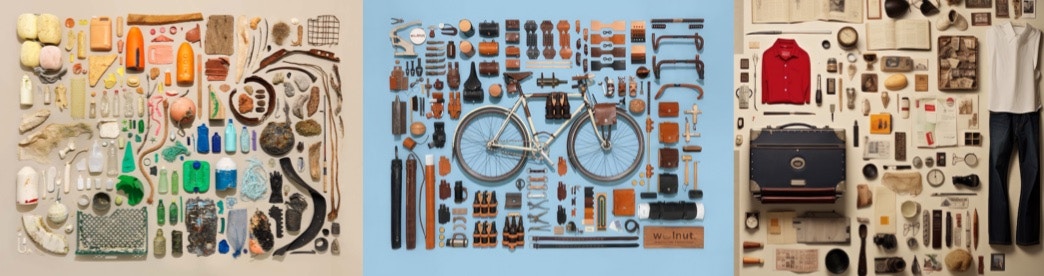
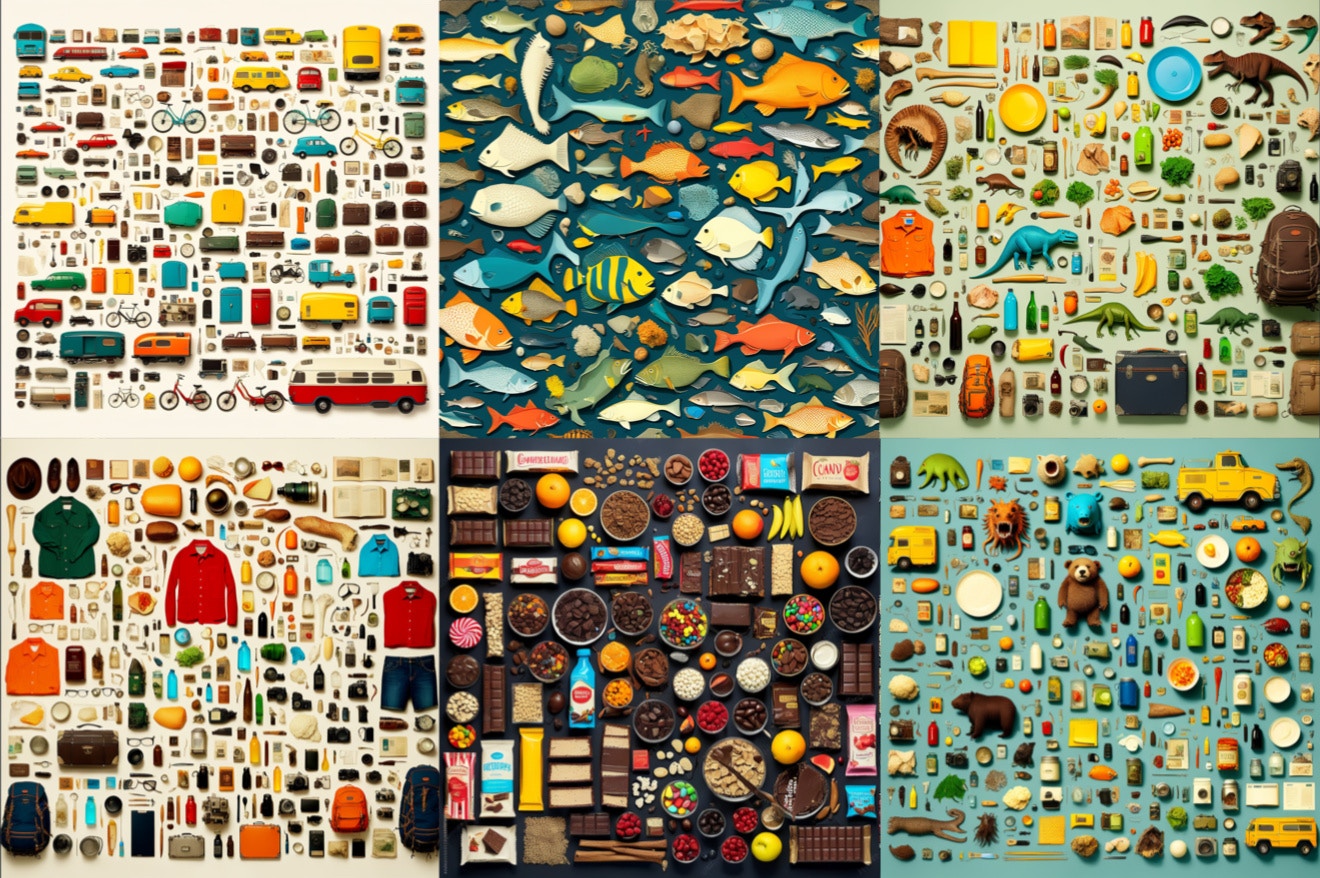
 With style models, you don't need to reference the concept - just prompt normally and the style will be applied.
 Styles can capture various aesthetics, color palettes, layout patterns, or abstract notions like [knolling](https://www.google.com/search?q=knolling\&tbm=isch):
 ## Generating with models
Once trained, select your model in the [creation tool](https://app.eden.art/create) and trigger it by name or `` in prompts.
## Exporting Models
Eden models are compatible with other tools supporting LoRA.
## Generating with models
Once trained, select your model in the [creation tool](https://app.eden.art/create) and trigger it by name or `` in prompts.
## Exporting Models
Eden models are compatible with other tools supporting LoRA.
 ### AUTOMATIC1111
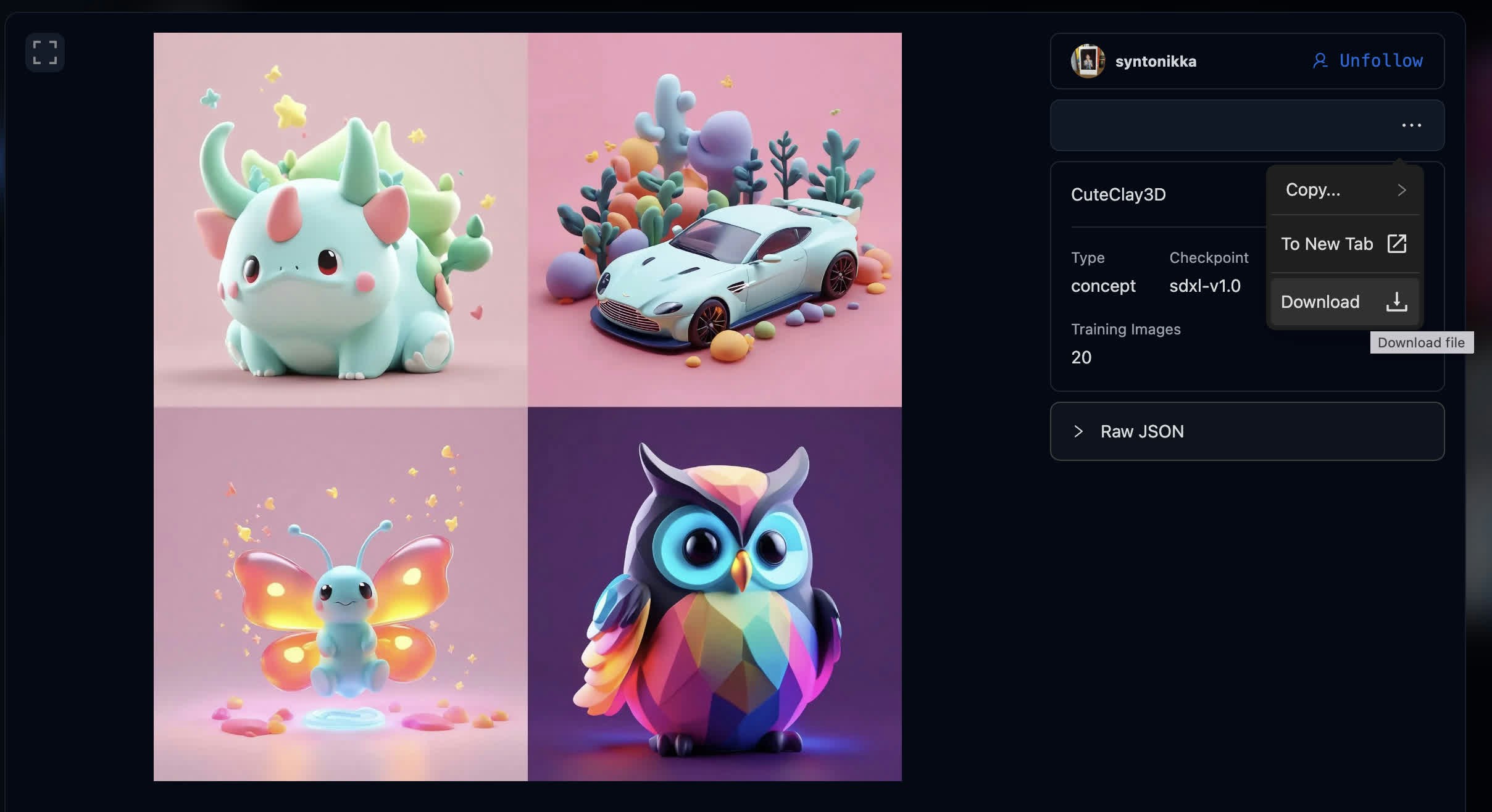
Download concept and extract the .tar file
* Put `[lora_name]_lora.safetensors` in `stable-diffusion-webui/models/Lora`
* Put `[lora_name]_embeddings.safetensors` in `stable-diffusion-webui/embeddings`
Use [JuggernautXL\_v6](https://civitai.com/models/133005/juggernaut-xl) as base checkpoint
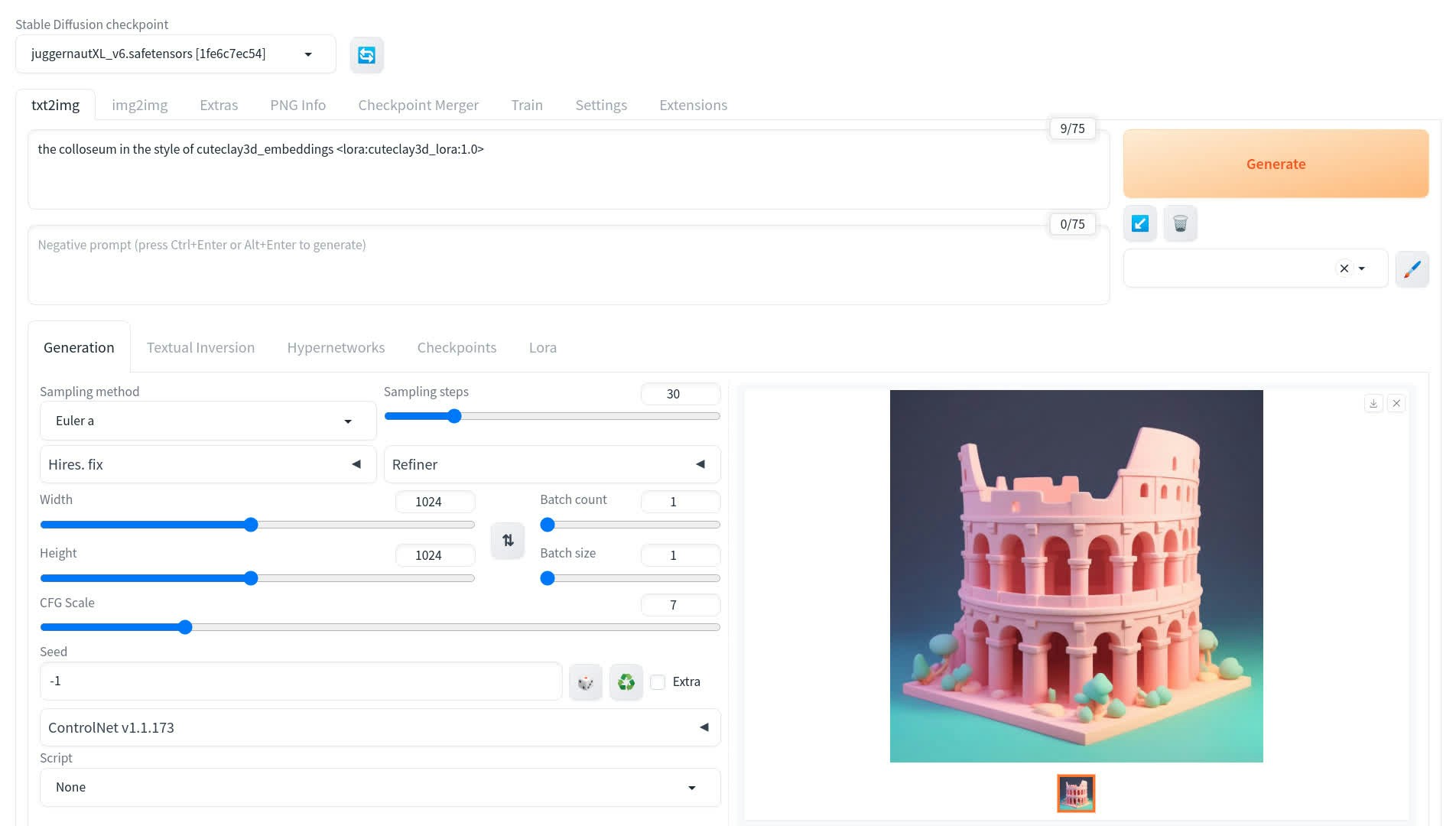
Load both embedding AND LoRA weights by triggering in prompt
### AUTOMATIC1111
Download concept and extract the .tar file
* Put `[lora_name]_lora.safetensors` in `stable-diffusion-webui/models/Lora`
* Put `[lora_name]_embeddings.safetensors` in `stable-diffusion-webui/embeddings`
Use [JuggernautXL\_v6](https://civitai.com/models/133005/juggernaut-xl) as base checkpoint
Load both embedding AND LoRA weights by triggering in prompt
 * **Face/Object modes**: Use `[lora_name]_embeddings` in prompt
* **Style concepts**: Use `"... in the style of [lora_name]_embeddings"`
### ComfyUI
* Put `[lora_name]_lora.safetensors` in `ComfyUI/models/loras`
* Put `[lora_name]_embeddings.safetensors` in `ComfyUI/models/embeddings`
Use "Load LoRA" node and adjust strength
Reference with `embedding:[lora_name]_embeddings` in prompt
* **Face/Object modes**: Use `[lora_name]_embeddings` in prompt
* **Style concepts**: Use `"... in the style of [lora_name]_embeddings"`
### ComfyUI
* Put `[lora_name]_lora.safetensors` in `ComfyUI/models/loras`
* Put `[lora_name]_embeddings.safetensors` in `ComfyUI/models/embeddings`
Use "Load LoRA" node and adjust strength
Reference with `embedding:[lora_name]_embeddings` in prompt
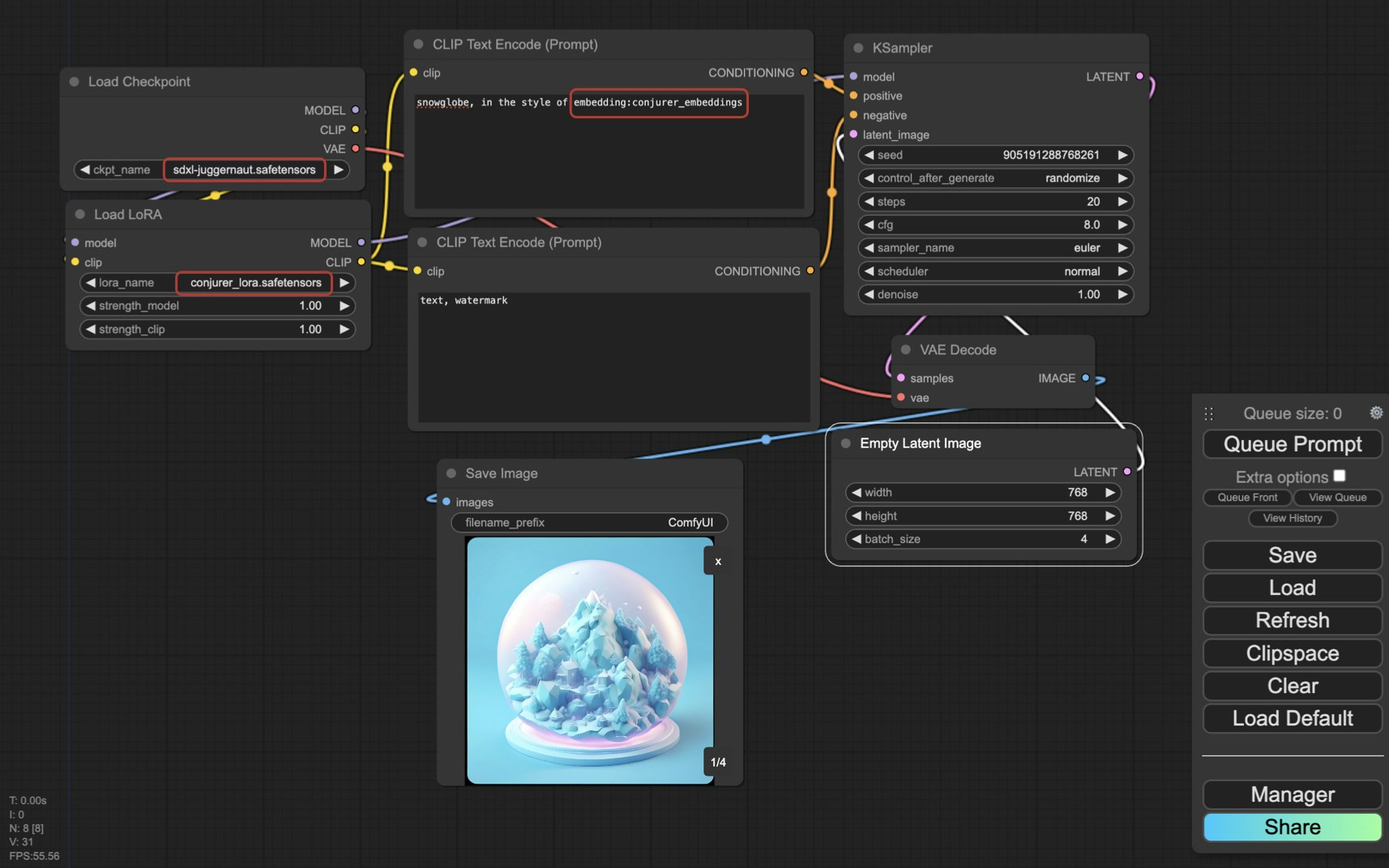 LoRA strength has relatively small effect because Eden models optimize token embeddings rather than LoRA matrices.