> ## Documentation Index
> Fetch the complete documentation index at: https://docs.eden.art/llms.txt
> Use this file to discover all available pages before exploring further.
# Telegram
> Deploy your Eden agent to Telegram groups and channels
Deployments are experimental and currently in private beta. If you're interested in testing it now, please reach out to the devs on [Discord](https://discord.com/invite/4dSYwDT).
Users who have been granted access to the deployment beta will notice a "Deployments" section in each Agent's settings.
## Setup Process
### Configure with BotFather
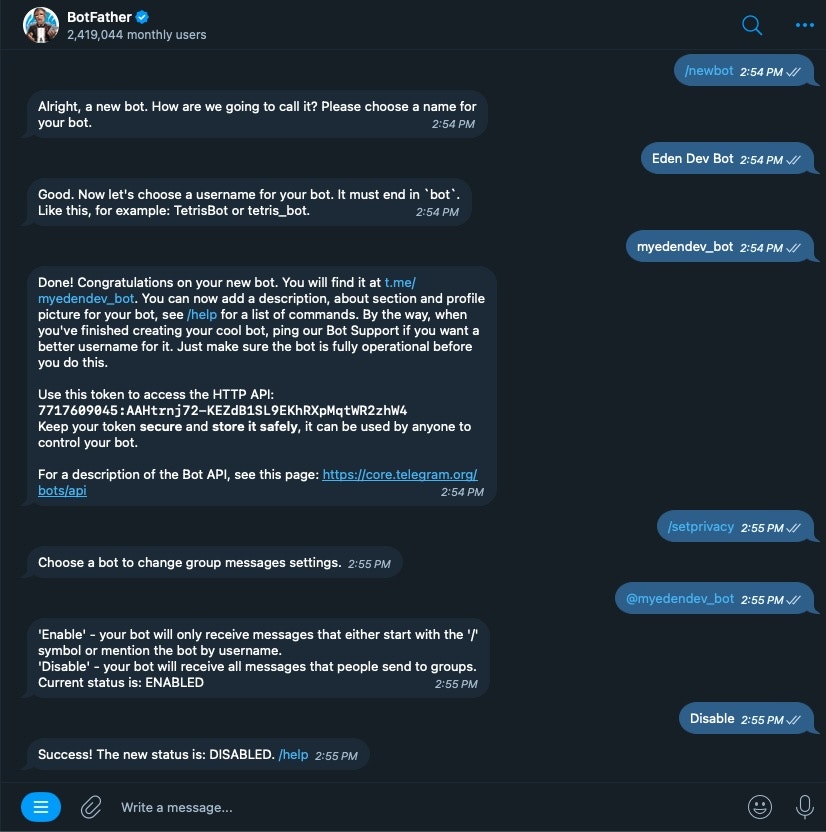
1. Message [@BotFather](https://t.me/botfather) in Telegram
2. Send `/newbot` to create a new bot
3. Provide:
* Display name for your bot
* Username ending with `_bot`
4. Copy the token and save it somewhere safe
5. Disable privacy mode to let the bot receive group messages:
* Send `/setprivacy`
* Select your bot
* Choose "Disable"
 Use `/setuserpic` to upload your bot's profile picture.
Go to your agent's deployment settings:
1. Select **Telegram**
2. Paste the token into the "Token" field
Use `/setuserpic` to upload your bot's profile picture.
Go to your agent's deployment settings:
1. Select **Telegram**
2. Paste the token into the "Token" field
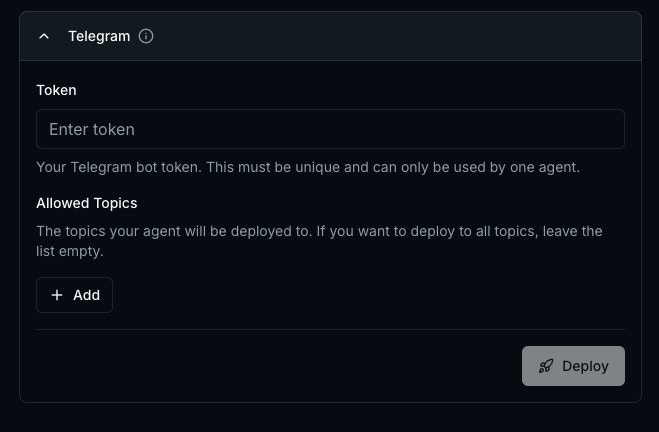 You need to specify which channels (groups/topics) the bot can chat in.
To get channel IDs, visit the channel in [Telegram Web](https://web.telegram.org/) and inspect the URL.
Copy everything after the last slash and #.\
Format: `-some_number`\
Example: `-4656194598`
You need to specify which channels (groups/topics) the bot can chat in.
To get channel IDs, visit the channel in [Telegram Web](https://web.telegram.org/) and inspect the URL.
Copy everything after the last slash and #.\
Format: `-some_number`\
Example: `-4656194598`
 Copy everything after the last slash.\
Format: `-100` + `some_number` + `_some_string`
If your URL has `/k/`, try changing it to `/a/` instead.
Example: `-1002429164874_30`
Copy everything after the last slash.\
Format: `-100` + `some_number` + `_some_string`
If your URL has `/k/`, try changing it to `/a/` instead.
Example: `-1002429164874_30`
 Add these IDs to "Allowed Channels" for each channel you want your bot to access.
1. Click **Deploy**
2. Wait for deployment confirmation
3. Try mentioning your bot in an allowed channel
The deployment may show as "successful" a few minutes before it's actually ready. If successful but not responding, please wait a few more minutes.
## Tool
Go to one of the allowed channels and mention your bot in a message. If it responds, you're all set!
## Using the Telegram Tools
The following tools are available for your agent to use once it is deployed to Telegram:
* `telegram_post` - Post a message to a channel
You can use these in a conversation with your agent.
## Getting Channel IDs
### Quick Reference
| Channel Type | ID Format | Example |
| ----------------- | ------------------- | ------------------- |
| Regular Group | `-number` | `-4656194598` |
| Group with Topics | `-100number_string` | `-1002429164874_30` |
### Troubleshooting Tips
* Use [Telegram Web](https://web.telegram.org/) to get IDs
* For topic groups, ensure URL uses `/a/` not `/k/`
* Double-check the bot has been added to the group
* Verify privacy mode is disabled in BotFather
Add these IDs to "Allowed Channels" for each channel you want your bot to access.
1. Click **Deploy**
2. Wait for deployment confirmation
3. Try mentioning your bot in an allowed channel
The deployment may show as "successful" a few minutes before it's actually ready. If successful but not responding, please wait a few more minutes.
## Tool
Go to one of the allowed channels and mention your bot in a message. If it responds, you're all set!
## Using the Telegram Tools
The following tools are available for your agent to use once it is deployed to Telegram:
* `telegram_post` - Post a message to a channel
You can use these in a conversation with your agent.
## Getting Channel IDs
### Quick Reference
| Channel Type | ID Format | Example |
| ----------------- | ------------------- | ------------------- |
| Regular Group | `-number` | `-4656194598` |
| Group with Topics | `-100number_string` | `-1002429164874_30` |
### Troubleshooting Tips
* Use [Telegram Web](https://web.telegram.org/) to get IDs
* For topic groups, ensure URL uses `/a/` not `/k/`
* Double-check the bot has been added to the group
* Verify privacy mode is disabled in BotFather